Stuck on a Creative Project? Change the Question Before the Tools

Stuck on a Creative Project? Change the Question Before the Tools

Creativity & Inspiration

Stuck on a Creative Project?

Change the Question Before the Tools

Blue Woman

Creativity & Inspiration

Make room for a new question.

A blank page can disguise several different problems. You may lack information, face conflicting demands or be trying to finish an idea before you have explored it. Buying a new app will not tell you which problem you have.

Try this short working session before changing your whole setup. The twenty-minute structure below is our editorial exercise, not a scientifically validated treatment for a creative block. Use it for a manageable project: a poster, a song introduction, a page layout or a short piece of writing.

First five minutes: name the obstacle

Write one sentence describing the difficulty without judging yourself. “I cannot choose an opening image” gives you something to work on. “I am not creative” turns a design decision into a verdict about your identity.

Underneath, separate missing information from preferences. If the client has not named the audience, that is a question to resolve. If you have three possible colour directions, that is a choice to explore. Do not spend a sketching session pretending that missing approval is a shortage of ideas.

“Leave with one visible next step.”

A question, three rough options and one small test.

PUT IT INTO PRACTICE

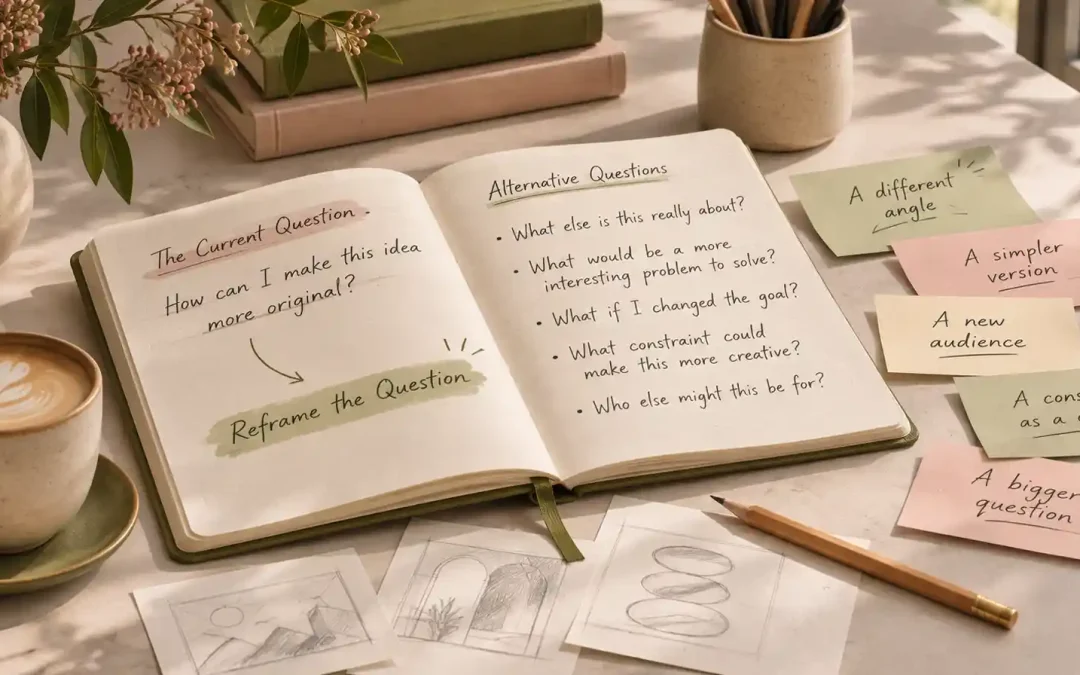
Next five minutes: ask a different question

Stanford d.school’s How Might We resource presents question-framing as a way to open up ideation. Our exercise borrows the general idea of reframing, with its own timings and examples rather than reproducing the worksheet.

Turn the obstacle into a question with room for more than one answer. Instead of “Which fashionable font should I use?”, ask “How could a first-time reader recognise the important information quickly?” The second question may lead to spacing, hierarchy or fewer words, not just a different typeface.

For music, replace “How do I make this intro bigger?” with “What should a listener notice before the vocal arrives?” Keep the problem specific enough to guide a decision. A question about changing everything rarely helps you make the next mark.

Next five minutes: make three deliberately rough options

Draw thumbnails, write short openings or record rough musical ideas. Give each option a distinct organising principle. One might simplify, one might contrast and one might begin somewhere unexpected.

Do not polish the first option while leaving the others imaginary. Make each concrete enough to compare. If you are working on a website, label the first thing a visitor should see. If you are writing, state what the opening makes the reader want to know.

cool woman

Last five minutes: choose the next test

Pick one option and define a small check. Show a sketch to a reader, play two openings at the same listening level or place real text in the layout. Decide what you want to learn, not whether the project is now brilliant.

Write a stopping point: “I will test the hierarchy before selecting final imagery.” That sentence protects the next session from turning into another search for inspiration. Save the rejected options; they can explain your thinking later without all becoming finished work.

When the exercise reveals a different problem

Sometimes the useful result is a question for a collaborator, a smaller scope or a decision to rest and return. The exercise does not require you to force a result on schedule. If an external constraint blocks progress, document it clearly.

A note for your next working session

Project · Obstacle · Missing information
A question that allows more than one answer
Three rough options with different organising principles
The next test · What you want to learn · Where to stop

What to take forward

The point is to leave with a visible next step. A rough page, a short recording or one answerable question gives your project something firmer than the instruction to be inspired.

Keep the next step small enough to try

Save the question and the rough alternatives with the project. They give the next session a starting point without requiring every sketch to become finished work.

Explore more useful ideas and practices at NexusGen.
AEO Without the Hype: Make One Service Page Easier to Understand

AEO Without the Hype: Make One Service Page Easier to Understand

Web, Design & Digital Marketing

AEO Without the Hype:

Make One Service Page Easier to Understand

woman-on-laptop

Web, Design & Digital Marketing

Clear information comes first.

A small business does not need another acronym before it can explain what it does. If you are hearing about answer engine optimisation, or AEO, start with a page a customer already needs: one clear service page.

This exercise is an editorial improvement, not a promise that an AI service will recommend you. Choose a page for a real service you provide. Keep a copy of the current version so the changes can be reviewed and reversed.

Answer the first decision clearly

Near the top, explain what the service is, who it helps, where it is available and how to take the next step. Replace a vague opening such as “solutions for a changing world” with a description a customer could repeat to someone else.

For example, a repair service might specify the type of equipment it handles and the area it serves. Do not broaden the location list merely to attract searches. A useful page should reduce uncertainty about whether the business can actually help.

“Make the next step easy to understand.”

A real service, useful answers and evidence a reader can check.

PUT IT INTO PRACTICE

Collect the questions customers already ask

Look through approved, non-confidential enquiry notes or ask the people who answer the phone. Choose questions about suitability, preparation, process, timing and what is included. Answer them in the body of the page using descriptive headings.

If a price requires an estimate, explain what information is needed for that estimate. If an availability detail changes often, identify how customers can confirm it. Clear limits are more helpful than invented certainty.

Know what Google actually says

Google’s guidance on AI features in Search says established SEO practices remain relevant; no special AI markup is required for those features. It also states that eligibility does not guarantee indexing or appearance. That guidance concerns Google’s features, not a universal rule for every AI assistant.

The same page emphasises discoverable internal links, important information in text and consistency between structured data and visible content. Do not mistake a new label on an SEO package for evidence that a particular result can be guaranteed.

partners aeo seo

Add evidence where the claim appears

Put a relevant qualification, example or source next to the claim it supports. Describe a real process rather than saying you are the best. Use images that show something useful, and give them accurate alternative text. Obtain permission before sharing client details or identifiable work.

Separate first-hand experience from general guidance. A photographed example can demonstrate a particular job; it does not prove the same result for every customer. Remove testimonials, statistics or claims that nobody can trace to an authorised source.

Test the page as a customer

On a phone, ask someone unfamiliar with the business to find the service, its location and the next step. Watch where they hesitate. Check links and forms, and ensure the important answers are readable without opening a decorative graphic.

Compare the page with related pages so they do not all repeat the same introduction. For a broader decision about improving an existing site, our Website Quick Fix guide provides another starting point.

A service-page review you can repeat

Service · Audience · Actual service area · Next step
Questions answered in readable text
Claims supported by relevant evidence
Links and forms tested on a phone · Changes dated

Keep a small change log

Record what changed, why and when. Look for useful enquiries and successful customer actions, not just isolated mentions in an AI answer. Do not interpret a single search result as a stable measure of visibility.

The immediate win is a page that makes your service easier to understand. That is valuable to a person deciding whether to contact you, even when the search interface changes again.

Keep the page useful as search changes

Revisit the information when your service changes. The page should help a customer make a decision, and its claims should remain easy to verify.

Explore more useful ideas and practices at NexusGen.


Before Buying Comic Storage: Make a Collection Record You Can Actually Use

Before Buying Comic Storage: Make a Collection Record You Can Actually Use

Culture, Collectibles & Lifestyle

Before Buying Comic Storage:

Make a Collection Record You Can Actually Use

comic-books

Culture, Collectibles & Lifestyle

Know what you already have.

A new storage box feels like progress until you cannot find the comic you wanted to read. Before buying supplies, give your collection a record that connects each item to its identity, condition and location.

You do not need a complicated database. A spreadsheet or notebook can work if you use it consistently. Start with one box rather than trying to catalogue everything in a single weekend.

Record the edition, not just the title

Give each item your own unique number. Add the series title, issue, publisher, date shown on the publication and any visible edition or printing information. Note uncertainty rather than guessing. Photograph the identifying information when you can do so without stressing the book.

Separate what is printed on the object from what a seller or online listing claims. A description copied from a similar-looking item may refer to a different edition. Your record becomes much more useful when someone can trace a statement back to the object itself.

“A useful record starts with your own collection.”

Identity, condition and location—one box at a time.

PUT IT INTO PRACTICE

Describe condition without pretending to grade professionally

Use plain observations: a crease near a corner, a loose page, a mark on the cover or a detached part. Date the note and add a photograph. Avoid assigning a professional numerical grade unless it comes from an identified assessment you can document.

Do not repair a tear simply to make the photograph look tidier. The Canadian Conservation Institute’s book-care guidance warns about damage from pressure-sensitive tape and discusses the importance of suitable handling. Consult a paper conservator for a fragile or damaged item rather than improvising a treatment.

Give the location a name that survives a move

Label a box with a stable code such as C01. Use the same code in the inventory, then describe where the box is currently kept. When you move it, update the location field rather than renumbering every comic.

For a loan or display, add the date, destination and expected return. Keep a digital copy of the inventory separate from the collection, and test that you can open it. A record stored only in the box it describes cannot help much when that box is unavailable.

comics bandes dessinees

Look at the environment before the product label

CCI’s paper and books overview identifies light, heat, pests and physical forces as risks. Its book-care guidance also discusses unstable conditions in basements, attics and garages. These are reasons to assess the actual storage location, not evidence that any box labelled archival solves every problem.

For a display, consider whether a reproduction or your own collection photograph can tell the story while the original is stored appropriately. Avoid forcing a book open for a photograph. If an item is fragile, keep the documentation simple and seek specialised advice.

Buy for a defined need

Measure what must fit without squeezing it. Ask suppliers for material specifications and intended use instead of relying only on a reassuring marketing word. Keep the product details with the collection record so a future change can be traced.

Record purchase cost and provenance separately from any estimated value. This inventory is not an appraisal, an insurance valuation or a prediction of resale returns. If those are needed, ask the relevant qualified professional what evidence they require.

Your first collection record

Item ID · Series · Issue · Edition or printing
Visible condition · Dated photographs
Box code · Current location · Loan or display details
Purchase cost and provenance · Uncertainties to resolve

What to take forward

Finish your first box by finding one item from the inventory alone. If that works, the system has already done something useful. Then repeat it in a manageable batch, leaving yourself more time to enjoy the collection you are organising.

Make the record useful before making it elaborate

Use the same field names for the next small batch. Keep observations separate from estimates, and make the location easy to update.

Explore more useful ideas and practices at NexusGen.

Can LibreOffice Replace Your Office Subscription? Test Five Files First

Can LibreOffice Replace Your Office Subscription? Test Five Files First

Creative Software & Better Alternatives

Can LibreOffice Replace Your Office Subscription?

Test Five Files First

office

Creative Software & Better Alternatives

Try your files. Then decide.

Free software is only a bargain if it can handle your work. LibreOffice is worth considering when you mainly need documents, spreadsheets and presentations, but a familiar file extension does not prove that a complicated file will behave exactly as expected.

The LibreOffice project offers its desktop office suite at no charge and describes it as open source. Writer, Calc and Impress cover word processing, spreadsheets and presentations. That removes a software purchase price from this particular trial; it does not remove migration, training or support costs.

Start with copies of five representative files

Choose a simple document, a heavily formatted document, a working spreadsheet, a presentation and a file used in collaboration. Work from copies and preserve the originals. Include the things you depend on: footnotes, charts, comments, formulas or a client’s template.

Write down who receives each file and what they need to do with it. A PDF sent for reading and a spreadsheet passed back and forth for editing are different requirements. The best replacement is the one that fits the exchange, not just your own screen.

“Compatibility is a workflow, not just a file extension.”

Five familiar files. A real exchange. A reversible trial.

PUT IT INTO PRACTICE

Check the round trip

Open a copy, make a small change, save it in the format you normally exchange and reopen it in the receiving application where available. Look at page breaks, fonts, tables, charts, slide alignment and formulas. Compare the result against the original task, not a vague impression that everything looks close.

LibreOffice’s Microsoft Office compatibility guidance confirms support for opening and saving Office formats and explains important macro differences. File-format support is a starting point for testing, not a guarantee for every feature in every document.

Treat macros and specialised workflows as a separate decision

If your business depends on a macro-enabled workbook, do not treat it as an ordinary spreadsheet. List the automation, add-ins, templates and external systems it needs. Test with an authorised copy and someone who can judge the result. Do not enable unfamiliar macros just to complete an experiment.

Do the same for live collaboration: invite a colleague to perform the exchange you actually use. Record the hand-offs and manual steps. This article does not claim that a desktop suite duplicates every service bundled with a commercial subscription.

office-studio

Add up the costs you would really avoid

List the subscription components you currently use, then ask which would still be needed. If another service or licence remains necessary, count it. Add time for learning, template adjustments, support and any parallel transition period.

A useful worksheet has three columns: current workflow, trial workflow and unresolved problem. Next to each problem, write a concrete example and who can fix it. One important failure may outweigh ten small successes; one unused premium feature should not dictate your whole budget.

Choose a partial switch if that is the sensible result

You might use LibreOffice for personal writing while keeping a commercial tool for a particular client exchange. You might decide that all five files passed and plan a careful transition. Or you might stay put because an essential workflow failed.

Keep a dated copy of your results and the application versions used. Recheck the official download and business-support information before a wider rollout. For a small organisation, start with one person and a reversible trial rather than replacing everyone’s tools on a Friday afternoon.

A record for each test file

File · Required task · Recipient · Application versions
Current workflow · Trial workflow · Unresolved problem
Result after saving and reopening · Manual repairs needed
Time and support costs · Decision and review date

What to take forward

The aim is a dependable working setup with an understandable cost. The test earns its place when it exposes a hidden problem before you cancel something you still need.

Choose around the work you need to exchange

Keep the original files and the trial results. A gradual switch is easier to assess when you know which tasks passed, which need help and which still require your existing tools.

Explore more useful ideas and practices at NexusGen.

Before You Pay for an AI Tool: Run This Five-Task Trial

Before You Pay for an AI Tool: Run This Five-Task Trial

AI & Technology

Before You Pay for an AI Tool:

Run This Five-Task Trial

ai-world

CHOOSING AN AI TOOL

Make the tool earn its place.

An AI demonstration can look impressive because someone else has chosen the task. Your working day is less cooperative: incomplete notes, awkward constraints and answers that need checking. Before adding another subscription, test a tool against the work you actually repeat.

This is a practical comparison method, not a ranking of ChatGPT, Claude or any other product. No paid subscription or private documents are necessary to design the trial. Start with harmless sample material and decide what a useful result would look like before reading an answer.

Choose five tasks from your own week

Pick one task in each of these categories: drafting, summarising, organising information, generating alternatives and checking an explanation. A freelancer might use a client email, meeting notes, a project checklist, headline ideas and a confusing software instruction. Replace names and confidential details with fictional ones.

Make the sample small enough to inspect yourself. If you cannot tell whether the answer is right, it is a poor first test. A polished response to a topic you do not understand is hard to score honestly.

“A useful answer is one you can check.”

Your tasks. Your criteria. The time you actually spend.

A TRIAL BUILT AROUND YOUR WORK

Write a miniature brief

Give each task a goal, source material, audience, constraints and expected format. For example: “Using only these fictional meeting notes, produce five actions with owners. Mark missing owners as unknown. Do not invent deadlines.”

OpenAI’s official prompting guide discusses explicit instructions and examples. Our trial applies that general principle to everyday work; it does not establish that different products follow instructions equally well.

Use the same starting brief in every tool. Record the date, product, visible model or mode and plan. If you change the brief halfway through, keep both versions so you know what you are comparing.

Score the answer before admiring the prose

For each task, score accuracy, instruction-following and editing effort from zero to two. Zero means unusable, one means substantial repair and two means usable after a normal review. These are your working definitions, not an industry benchmark.

Also record minutes spent prompting, checking and correcting. A response that appears instantly but needs a long repair may save less time than a plain, dependable result. Note one concrete failure beside each score: an invented date, a missed constraint or an answer that ignored the supplied material.

ai-worlds

Repeat the task that matters most

Run your most frequent task again with a different sample. One lucky response is a weak reason to rearrange your workflow. Try a missing detail deliberately: does the tool flag it, ask a useful question or quietly supply something plausible?

Ask for a checkable explanation or supporting sources where appropriate, then inspect those sources yourself. A second answer from the same tool is another output to evaluate, not independent proof that the first answer was correct.

Make the purchase decision last

Check the current plan, usage limits, cancellation terms, privacy controls and export options on the provider’s official pages. This article deliberately quotes no subscription prices: the right cost comparison depends on the actual plan you are considering.

Write a one-sentence verdict: “Useful for these two tasks, unreliable for this one, worth this much to me per month.” You may discover that your existing tools are enough. You may also find a paid tool worth keeping. Either result is more useful than collecting subscriptions because a demonstration looked clever.

A simple scorecard to reuse

Task · Product · Model or mode · Plan · Date
Accuracy: 0–2 · Instruction-following: 0–2 · Editing effort: 0–2
Total time: prompting, checking and correcting
One concrete failure · Your verdict

Use the same scorecard for all five tasks. A score of 2 means usable after a normal review.

Keep a record of your choice

Keep your briefs and scorecard. They become a small personal test set when a product changes, and a record of why you chose it.

Choose a subscription for a specific job

Ask a concrete question: does this tool improve a job you do regularly, once checking is included? Keep the results so you can compare again when your needs or the product change.

Explore more useful ideas and practices at NexusGen.